Enable Arrhythmia Detection for WatchPAT devices
WatchPAT HST devices can identify arrhythmia events (atrial fibrillation premature beats) during a sleep study. Administrators can enable Arrhythmia Detection by facility. All sleep studies initialized after enabling this feature include the Cardiac Rhythm Analysis section in the WatchPAT report. The raw data is also available in the pulse rate channel, which is part of the WatchPAT montage.
Important
The Detect Arrhythmia feature is only compatible with WatchPAT interface version 5.4.84.4 and later.
For optimal performance, ensure the latest SDI version is installed (see https://mysdi.somnoware.com/).
In the Configuration module (
 ), click Facilities.
Click the Edit icon next to the facility you want to enable Arrhythmia Detection in WatchPAT devices for.
From the HST administrations tab, in the Supported Devices table, hover over the WatchPAT device and click the More icon (
 ) > Set Default Value.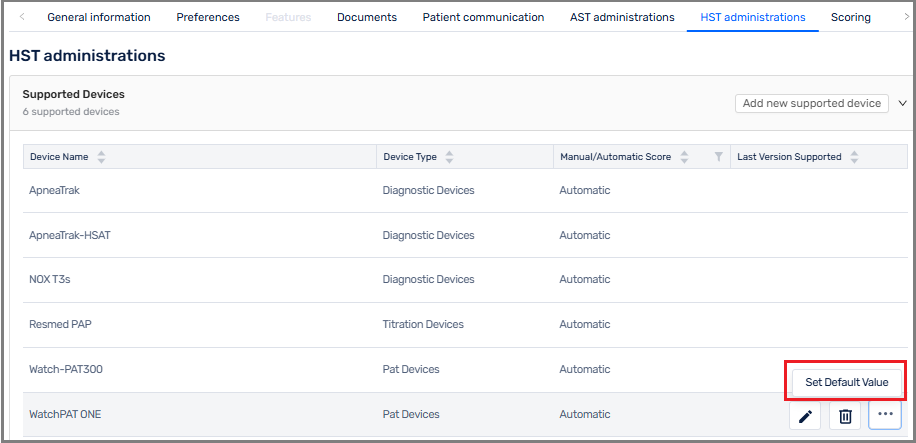
Select the Detect Arrhythmia check box.
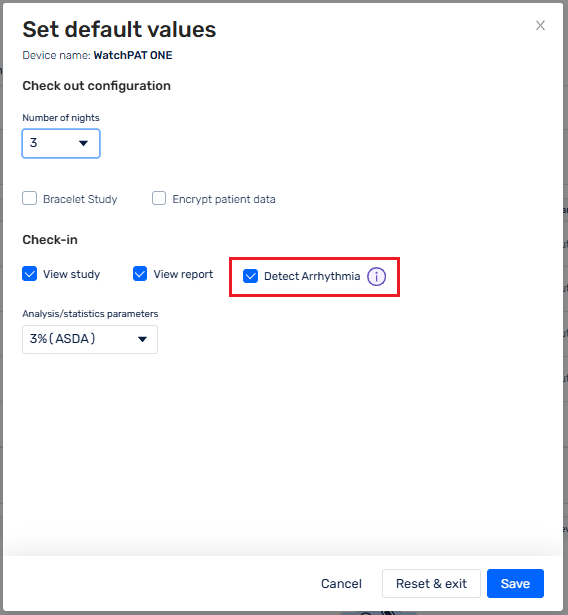
Click Save.
Any study processed using Somnoware and this device type will now detect arrhythmias.