Match patients manually
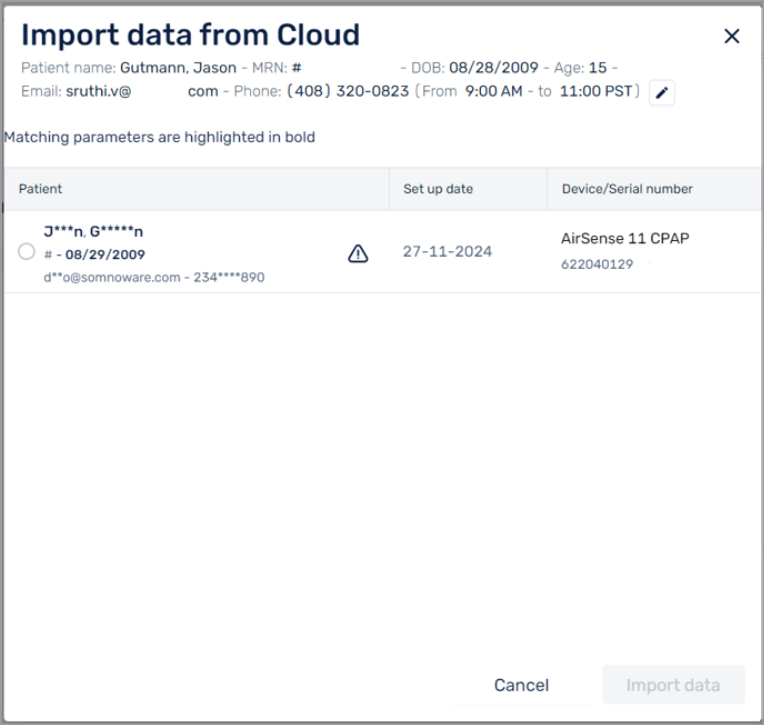
Administrators can match existing patient profiles in Somnoware with patients in external DME companies to access their AirView therapy data. Your DME partner must complete the organization-level integrator steps in AirView to match patients. If partial patient matches exist, for example, the patient name and date of birth match but no additional parameters match, the system flags them for review.
From the Compliance tab, click Subscribe for data.
Compare the patient profile information with the partially matching patient.
The matching parameters are in bold.
If the patient is a match, select the matching patient and click Import data.
Somnoware automatically imports the data from AirView and displays it on the Compliance tab for review.
From the Compliance tab, click the More options icon (
 ).
).Select Unmatch patient.
In the warning message, click Yes.
Somnoware unlinks the patient profile from the matched DME record. Compliance data no longer syncs from AirView.