Create advanced filters
Use Advanced filters to streamline the patient list with several customizable options. The filters you create are listed in the Therapy Monitor submenu.
In Therapy Monitor, click Population.
Click Advanced filters.
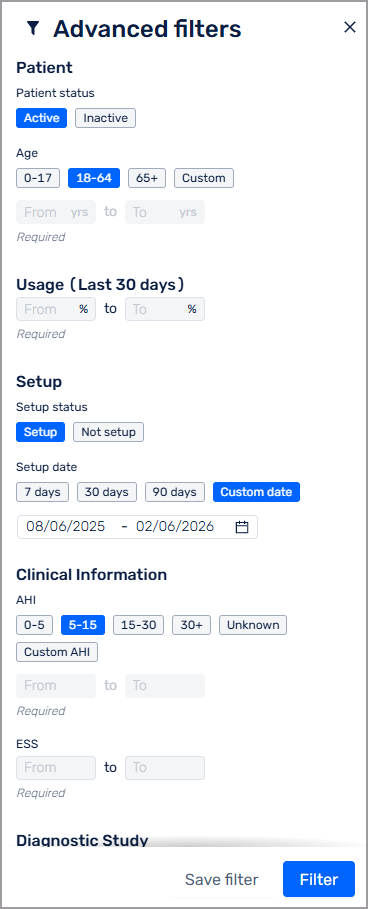
Select any of the following options to create your filter:
Patient: Patient account status and age.
Usage: Percentage of PAP machine usage over the past 30 days.
Setup: Status and date range.
Clinical information: AHI range.
Diagnostic study: Study date range, AHI range and Epworth Sleepiness Scale (ESS) range.
Tags: In collaboration with your team, Resmed administrators create tags to identity patient details, such as "CDL driver" or "hypertension."
Adherence: Percentage adherence over the past 30 days.
Adherence to therapy is defined as use of PAP for at least 4 hours per night on 70% of nights during a consecutive thirty (30) day period anytime during the first three (3) months of initial usage.[1]
Device: PAP machine type.
Click Save filter.
Type a name for your filter.
Click Save and filter.
You can click and drag the filter to move it up and down the list in the submenu.
[1] Centers for Medicare & Medicaid Services. Local Coverage Determination (LCD): Positive Airway Pressure (PAP) Devices for the Treatment of Obstructive Sleep Apnea. CMS.gov, 2024, viewed Aug 14, 2024, https://www.cms.gov/medicare-coverage-database/view/lcd.aspx?lcdid=33718&ver=52&bc=0.